
A dependable Claude setup gives you control of the account, enough usage for your work, and copies of the results. Use the official app for native features, a multi-model workspace for writing and document work, or an API connection when Claude Code needs to work with project files.
Two practical account precautions
Keep the account under your control. Anthropic’s consumer terms prohibit sharing account credentials or making the account available to someone else. Purchased accounts and shared subscriptions can also leave another person controlling the email, password, and payment records. Register your own account, use supported payment channels, and retain receipts.
Use a familiar connection that meets the regional requirements. A community discussion describes keeping a consistent network exit as one user’s precaution. This is anecdotal, not evidence that a residential IP or a fixed country prevents suspension. For eligible users experiencing login errors, the official troubleshooting guide suggests turning off a VPN, temporarily disabling browser extensions, and clearing cache and cookies.
Network settings do not establish eligibility. As checked on November 29, 2026, mainland China and Hong Kong are absent from the supported regions. The policy also covers APIs, Claude Code, cloud platforms, and authorized resellers. A successful payment or a different client does not change those conditions.
Separate suspension, outages, and exhausted usage
An explicit suspension notice belongs in the official appeals process. Failed logins and stalled replies require the actual error and service status. Ordinary capacity constraints may not appear on the status page.
The official usage guide describes five-hour and weekly allowances for most current subscriptions, shared across Claude surfaces. Long chats, attachments, and tools use more of that allowance. APIs have their own credit and rate limits. API credits bundled with some official plans have claim and usage conditions; they are not extra credit for interactive Claude Code sessions.
Refunds after suspension depend on the reason and payment channel
Suspension does not automatically trigger a refund, and cancellation does not return a past payment. The current consumer terms distinguish termination for a terms violation, which carries no contractual refund entitlement, from termination for another reason, for which website subscriptions receive a prorated refund for the remaining period. Statutory rights can still apply.
Use the payment channel on your receipt, rather than the device where you normally use Claude:
| Payment channel | Where to request a refund |
|---|---|
| Claude website | Account menu → Get help → Send us a message → Claude Refund Request; follow the eligibility check |
| Apple App Store | Sign in to reportaproblem.apple.com with the purchasing Apple Account and request a refund; Apple decides, and Anthropic cannot refund that charge |
| Google Play | Claude’s current instructions direct you to its support team; for an inactive subscription, provide the Google Play email or GPA order number |
These routes come from the official Claude refund guide. If you cannot sign in, contact support through the Help Center with your account email, charge date, amount, and receipt. Request cancellation and a refund review; account reinstatement uses the separate appeal process. Payments to an account seller or intermediary do not necessarily follow the website-purchase route.
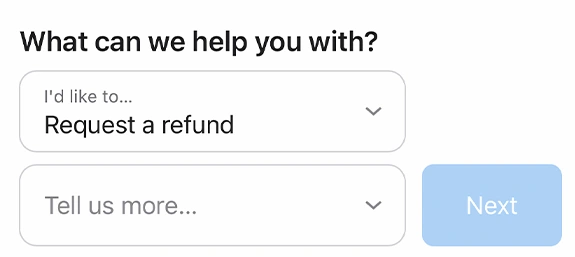
Actual controls from Apple’s official refund guide, cropped to the relevant form.
Apple’s refund status guide says 24–48 hours refers to an update on the request, not money reaching your bank. After approval, card refunds can take up to 30 days. Also confirm cancellation to avoid the next renewal; requesting a refund alone does not cancel an App Store subscription.
Denials do occur. In a November 4, 2026 Reddit report, a user said support cancelled the subscription after suspension but denied a refund on terms-violation grounds. This is an individual account, not a prediction for every request or evidence of an automatic “refund if banned” policy.
Use JuheNext Agent for writing and document work
JuheNext Agent uses its own account for conversations and files, and a JuheNext key for model calls. You do not provide a personal Claude login. Sign in to Agent, add your key to the wallet, and choose an available Claude model. The platform handles the endpoint.
For a redacted purchase contract, a useful request would be:
Extract the payment terms, delivery dates, and liability clauses. Cite the original passage for each item. Mark missing terms as “not specified” rather than filling them in.
Check the citations, then ask for a short internal summary. If your key provides GPT, Gemini, or DeepSeek, those models are available in the same workspace. For an independent comparison, start fresh conversations with the same source and instructions.
Export conversations as Markdown, JSON, or both, with selected saved attachments, images, and videos in a ZIP. Missing resources are reported. Export packages cannot currently be imported to resume the original conversation.
This suits people who want fewer separate logins and several models available for occasional work. The team is still developing Agent, and it does not reproduce every official Claude feature. Available models and tools depend on the deployment and your key. Billing is separate, and platform or upstream limits can still interrupt service. See the getting-started guide and current pricing.
Connect the Claude Code CLI through an API
Claude Code supports API and organizational gateway connections. JuheNext’s Messages reference provides a technical basis for the following configuration:
| Setting | Value |
|---|---|
| API base URL | https://api.juhenextvip.com |
| Format | Anthropic Messages |
| Credential variable | ANTHROPIC_AUTH_TOKEN for bearer authentication |
| Model | The complete Claude ID available to your key |
Install through the official setup guide, then configure PowerShell:
$env:ANTHROPIC_BASE_URL = 'https://api.juhenextvip.com'
$claudeKey = Read-Host 'JuheNext API key' -AsSecureString
$env:ANTHROPIC_AUTH_TOKEN = [System.Net.NetworkCredential]::new('', $claudeKey).Password
Remove-Variable claudeKey
$env:ANTHROPIC_MODEL = '<complete Claude model ID>'
claude
For Bash on macOS or Linux:
export ANTHROPIC_BASE_URL='https://api.juhenextvip.com'
read -r -s -p 'JuheNext API key: ' ANTHROPIC_AUTH_TOKEN
printf '\n'
export ANTHROPIC_AUTH_TOKEN
export ANTHROPIC_MODEL='<complete Claude model ID>'
claude
Replace the model placeholder; enter the key at the hidden prompt. These settings apply to the current shell and programs launched from it. Resolve conflicting existing API settings before switching.
Use the root URL, not the full /v1/messages endpoint. ANTHROPIC_AUTH_TOKEN sends a bearer token; ANTHROPIC_API_KEY sends x-api-key. Match the provider’s documented header. Inside Claude Code, run /status to confirm the effective URL, model, and credential source rather than assuming a successful login identifies the billing route.
Place a nonsensitive README.md in a temporary folder. Ask Claude Code to read and summarize it, then add a paragraph in a copy. Check that the stream completes and the diff is correct, and match the request to usage records. If chat works but tools fail, investigate compatibility and permissions.
Validate the full tool workflow with the steps above. Provider authorization and service scope must meet the applicable terms; one successful Messages request does not verify every feature.
Match the fix to the error
| Error | What to check |
|---|---|
| 401 | Key, authentication header, and effective credential source |
| Unknown model | The complete model ID available to the key |
| 429 | Rate limit versus spending cap; wait or address credit as appropriate |
| 529 | Usually upstream overload; compare status and provider records |
| Partial reply | Keep completed content and request IDs; inspect timeouts and streaming |
The error distinctions are documented in the official API reference. An interrupted task may already have edited files. Inspect the diff before resending the task. Keep the source files, instructions, and latest verified result so completed operations are not repeated unnecessarily.